Airflow engine
The Airflow adaptor materialises the graphs as Apache Airflow DAGs so you can use Airflow’s scheduling, monitoring, and retry machinery while keeping provenance in AiiDA. When the engine runs it serializes the graph and writes a Python module into your Airflow DAG directory. That module de-serializes the graph, rebuilds the DAG, and exposes it to the scheduler.
Installation
Install the Airflow extra:
pip install node_graph_engine[airflow]
Note
There is a compatibility issue between Airflow 3.1 and AiiDa 2.7 for the moment. So you need to install these packages separately.
Start Airflow in standalone mode:
airflow standaloneThis command starts the Airflow webserver and scheduler. It prints the generated username and password once the services are ready. Access the Airflow UI at
http://localhost:8080.
Example
from aiida import load_profile
from node_graph import task
from node_graph_engine.engines.airflow import AirflowEngine

load_profile()

@task()
def add(x, y):
    return x + y

@task()
def multiply(x, y):
    return x * y

@task.graph()
def add_then_multiply(x, y):
    the_sum = add(x=x, y=y).result
    return multiply(x=the_sum, y=y).result

ng = add_then_multiply.build(1, 2)

engine = AirflowEngine(dag_id="add_multiply")
results = engine.run(ng)
print("Result:", results)
Go to the Airflow UI at http://localhost:8080.
Then search for the add_multiply DAG and monitor it.

Here is the preview of the Airflow UI showing the job execution:

Use AiiDA commands to inspect the processes and their provenance:
verdi process list -a
Which will show something like:
2206  7s ago     NodeGraph<add_then_multiply>         ⏹ Finished [0]
2207  5s ago     add                                  ⏹ Finished [0]
2209  4s ago     multiply                             ⏹ Finished [0]
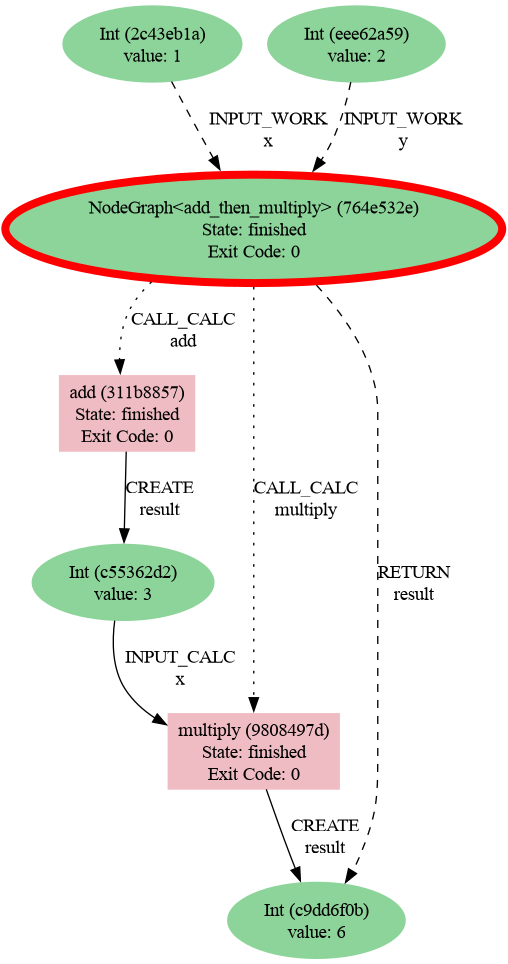
Then generate a provenance graph for a workflow:
verdi node graph generate 2206 -f png
Here is the resulting graph:
Submitting workflows
The Airflow engine supports two main methods to submit workflows:
run(): writes the DAG, registers and triggers a run immediately, and polls for the result file produced by the finalize task.submit()writes the DAG file and returns immediately. The scheduler will trigger it later. The Airflow scheduler only discovers new DAG files on its refresh cycle (defaultrefresh_intervalis 300 seconds). Runairflow dags reserializeif you want immediate registration without waiting for the processor.
For high-throughput workloads you can issue many submit() calls and
batch-register them with a single airflow dags reserialize command in the terminal.
Nested and dynamic workflows
Nested @task.graph workflows are supported. Whenever the engine encounters a nested
graph it generates a sub-DAG on the fly, writes it next to the parent DAG, and triggers
it. Because the engine can emit sub-DAGs dynamically, Graph-controlled constructs
such as if/else branches, for loops, or while loops translate naturally
into Airflow DAGs and runs.
Asynchronous tasks
Tasks implemented as async functions are converted into Airflow Deferrable
Operators with matching triggers. This lets you take advantage of Airflow’s asynchronous
execution model without changing your Graph task definitions.
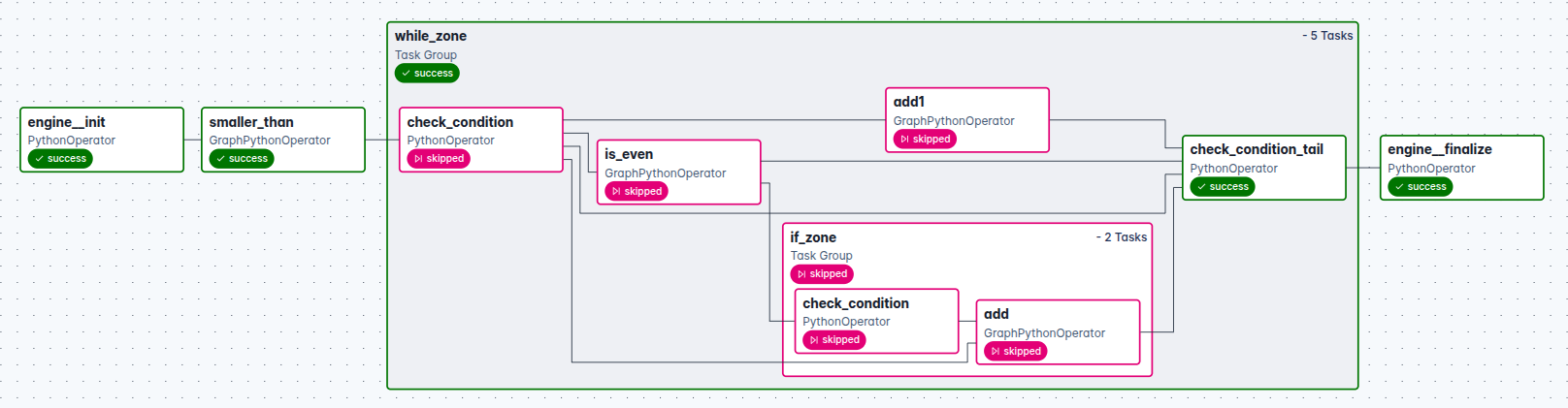
If/While zones
Airflow also supports If and While zones defined in node-graph. These are
compiled into TaskGroups with condition checks and body tasks.
Here is an example of sum of even numbers using If and While zones.
from aiida import load_profile
from node_graph import task, get_current_graph
from node_graph.manager import If, While
from node_graph_engine.engines.airflow import AirflowEngine

load_profile()

@task()
def smaller_than(x, y):
   return x < y

@task()
def add(x, y):
   return x + y

@task()
def is_even(x):
   return x % 2 == 0

@task.graph()
def while_with_if(index=0, limit=10,
                  total=0,
                  increment=1):

   graph = get_current_graph()
   graph.ctx.total = total
   graph.ctx.index = index
   condition = smaller_than(graph.ctx.index, limit).result

   with While(condition):
      is_even_cond = is_even(graph.ctx.index).result
      with If(is_even_cond) as if_zone:
            graph.ctx.total = add(x=graph.ctx.total, y=graph.ctx.index).result
      next_index = add(x=graph.ctx.index, y=increment).result
      graph.ctx.index = next_index
      if_zone >> next_index

   return graph.ctx.total

graph = while_with_if.build(index=1, limit=5, increment=1, total=0)
engine = AirflowEngine("test_sum_even_numbers")

dag = engine.build_dag(graph)
Here is the resulting graph:
Under the hood
The engine serializes the current Graph definition, writes a Python DAG wrapper
alongside the payload in $AIRFLOW_HOME/dags (defaulting to @once if you did not
provide a schedule).
Each submit uses a unique DAG id and file name (base id plus a UUID suffix) to avoid collisions between runs.