Local engine
The Local engine runs workflows inside the current Python process. It is a zero-dependency adaptor that is ideal for local development, tutorials, and unit tests where you want to keep execution synchronous while still recording full provenance in AiiDA.
Installation
Install the core package together with the AiiDA dependencies. No extra is required for the Local engine:
pip install node_graph_engine
Before running any graphs, make sure an AiiDA profile is available and loaded so that provenance can be stored in the database:
from aiida import load_profile

load_profile()  # Use verdi profile list/show to choose a specific profile
Example
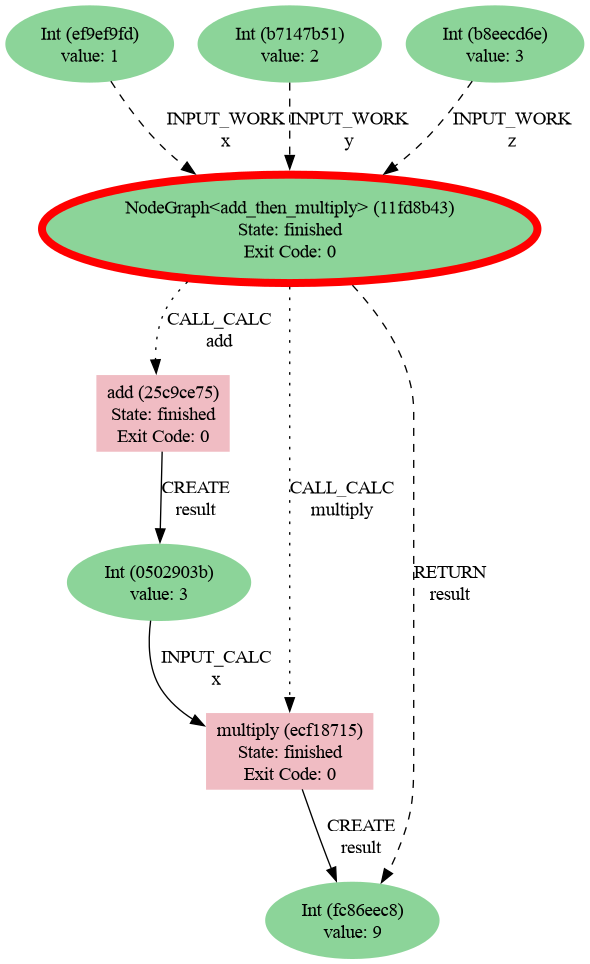
The snippet below mirrors the quick-start example and executes it with the Local engine. All calculations run locally and their provenance is written to the active AiiDA database.
from aiida import load_profile
from node_graph import task
from node_graph_engine.engines.local import LocalEngine

load_profile()

@task()
def add(x, y):
    return x + y

@task()
def multiply(x, y):
    return x * y

@task.graph()
def add_then_multiply(x, y, z):
    the_sum = add(x=x, y=y).result
    return multiply(x=the_sum, y=z).result

graph = add_then_multiply.build(x=1, y=2, z=3)

engine = LocalEngine()
outputs = engine.run(graph)
print(outputs)
Use AiiDA commands to inspect the processes and their provenance:
verdi process list -a
Which will show something like:
2230  4s ago     NodeGraph<add_then_multiply>         ⏹ Finished [0]
2231  4s ago     add                                  ⏹ Finished [0]
2233  4s ago     multiply                             ⏹ Finished [0]
Then generate a provenance graph for a workflow:
verdi node graph generate 2230 -f png
Here is the resulting graph: