Redun engine
The Redun adaptor submits tasks to a Redun scheduler. It bridges Redun’s asynchronous execution model with AiiDA provenance so you can analyse runs in both systems simultaneously.
Installation
Install the Redun extra:
pip install node_graph_engine[redun]Initialise a Redun project (for example inside your repository) if you do not have one already:
redun initAdjust
redun.inito point to the storage backend you intend to use. The default in-memory database works for quick experiments.Load an AiiDA profile in the environment that launches the Redun scheduler.
Example
from aiida import load_profile
from node_graph import task
from node_graph_engine.engines.redun import RedunEngine

load_profile()

@task()
def add(x, y):
    return x + y

@task()
def multiply(x, y):
    return x * y

@task.graph()
def add_then_multiply(x, y, z):
    the_sum = add(x=x, y=y).result
    return multiply(x=the_sum, y=z).result

graph = add_then_multiply.build(x=1, y=2, z=3)

engine = RedunEngine(name="redun-quick-start")
outputs = engine.run(graph)
print(outputs)
Use AiiDA commands to inspect the processes and their provenance:
verdi process list -a
Which will show something like:
2230  4s ago     NodeGraph<add_then_multiply>         ⏹ Finished [0]
2231  4s ago     add                                  ⏹ Finished [0]
2233  4s ago     multiply                             ⏹ Finished [0]
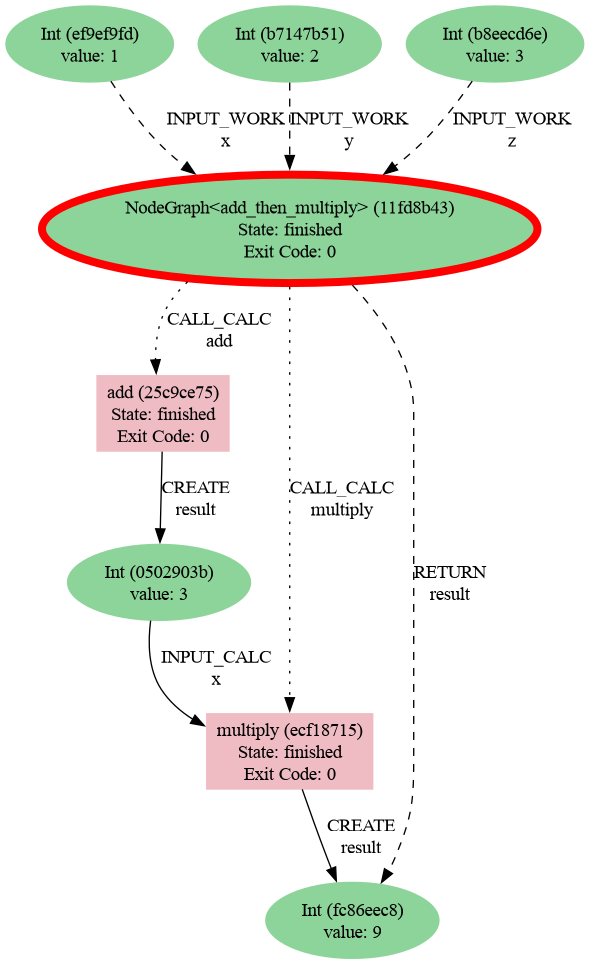
Then generate a provenance graph for a workflow:
verdi node graph generate 2230 -f png
Here is the resulting graph: