Executorlib (Pyiron) engine
The Executorlib adaptor integrates node-graph with the Pyiron ecosystem by submitting
tasks to executorlib executors (for example the SingleNodeExecutor or cluster-aware
executors). It is suited to high-throughput simulation workloads that already rely on
executorlib for scheduling.
Installation
Install the Executorlib extra, which bundles
executorlib:pip install node_graph_engine[executorlib]Configure any cluster credentials required by your executorlib executor. For local runs the default
SingleNodeExecutorworks without additional setup.Ensure an AiiDA profile is loaded before creating the engine so provenance can be recorded. The engine checks for an active profile on start-up.
Example
from aiida import load_profile
from executorlib import SingleNodeExecutor
from node_graph import task
from node_graph_engine.engines.executorlib import ExecutorlibEngine

load_profile()

@task()
def add(x, y):
    return x + y

@task()
def multiply(x, y):
    return x * y

@task.graph()
def add_then_multiply(x, y, z):
    the_sum = add(x=x, y=y).result
    return multiply(x=the_sum, y=z).result

graph = add_then_multiply.build(x=1, y=2, z=3)

executor = SingleNodeExecutor(max_workers=2)

engine = ExecutorlibEngine(name="executorlib-quick-start", executor=executor, manage_executor=False)
outputs = engine.run(graph)
print(outputs)
Use AiiDA commands to inspect the processes and their provenance:
verdi process list -a
Which will show something like:
2222  4s ago     NodeGraph<add_then_multiply>         ⏹ Finished [0]
2223  4s ago     add                                  ⏹ Finished [0]
2225  4s ago     multiply                             ⏹ Finished [0]
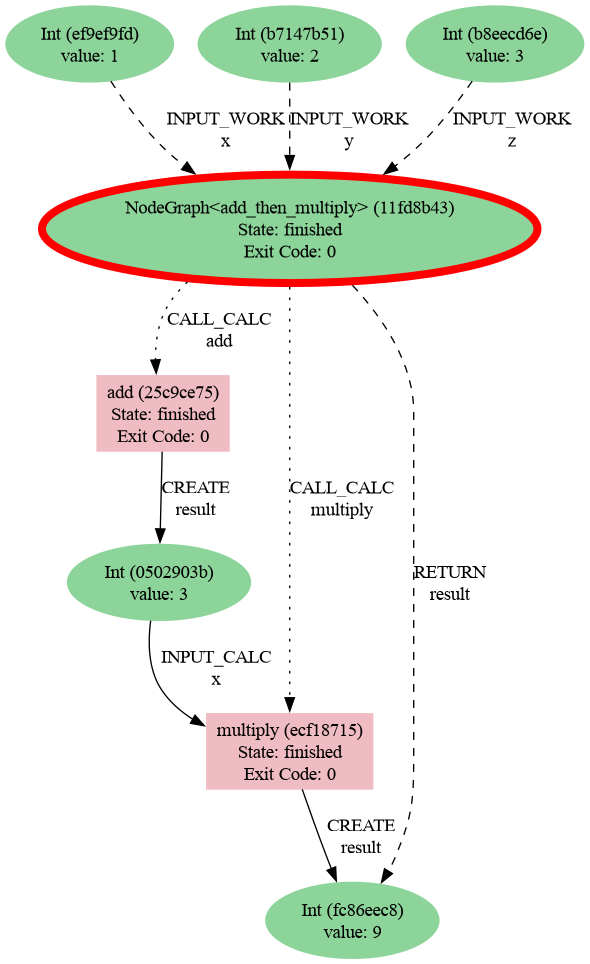
Then generate a provenance graph for a workflow:
verdi node graph generate 2222 -f png
Here is the resulting graph: